

Quick Answer: Yes, you can use Afterpay at Target, but you won’t find a “Pay with Afterpay” button at the checkout. Instead, you must use the Afterpay Virtual Visa Card through the Afterpay app. This works for both Target.com and in-store purchases via Apple or Google Pay.
Target is the ultimate “black hole” for your wallet. You go in for a pack of sponges and somehow come out with $200 worth of home decor and a new air fryer. It’s exactly why Buy Now, Pay Later (BNPL) services like Afterpay have become so popular.
However, if you’ve ever reached the checkout page on Target’s website and felt confused because the Afterpay logo was missing, you aren’t alone. Target has a complicated relationship with third-party payment apps. While they have their own financing options, using Afterpay requires a specific workaround that most people don’t know about.
In this guide, I’ll break down exactly how to bridge that gap and use Afterpay for your next Target run without getting your card declined.
Why does Target not accept Afterpay directly?
The first thing you need to understand is that Target does not have a direct partnership with Afterpay. Unlike stores like Old Navy or Ulta, where Afterpay is built directly into the payment screen, Target pushes its own credit lines (like the Target Circle Card) and its partnership with Affirm.
Because there is no direct “API integration,” Target’s website doesn’t recognize your Afterpay account. To get around this, Afterpay uses the Visa Network. When you “use Afterpay at Target,” you are actually generating a one-time-use virtual Visa card. Target sees it as a standard credit card payment, while Afterpay handles the installments on your side.
| Feature | Target + Afterpay Status |
|---|---|
| Direct Checkout Button | No |
| Virtual Card Accepted | Yes (Visa) |
| In-Store Tap-to-Pay | Yes (via Digital Wallet) |
| Interest Rate | 0% (if paid on time) |
How to use Afterpay on Target Website?
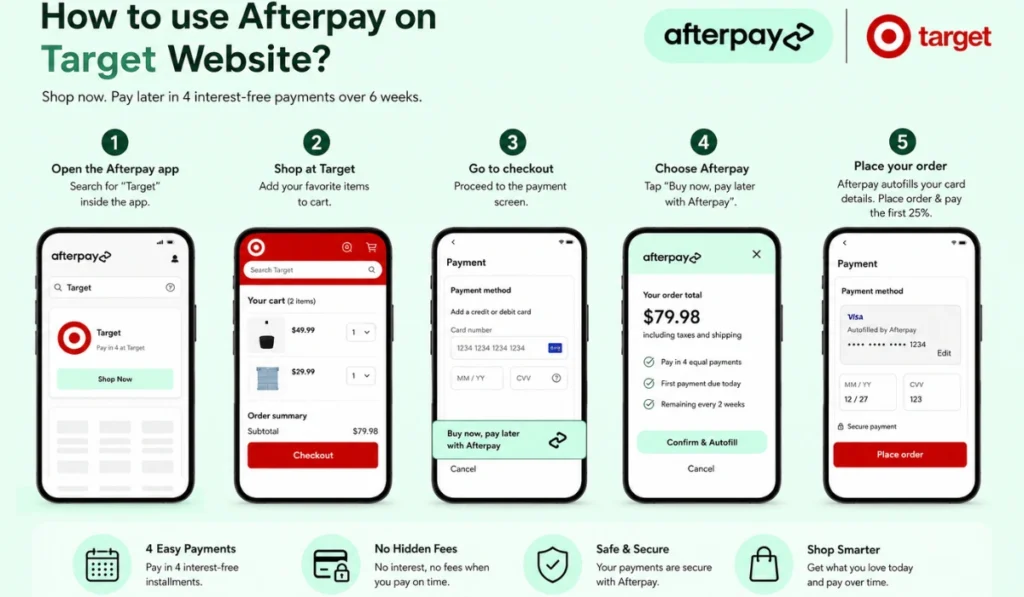
If you are shopping online, you cannot go directly to your mobile browser or the Target app. You have to let Afterpay be the “driver.”
- Launch the Afterpay App: Do not go to Target.com first. Open the Afterpay app and use their internal search bar to find “Target.”
- Make Your Cart: Shop through the browser inside the Afterpay app. Add your items just like you normally would.
- Go to Checkout: Proceed to the payment screen where it asks for credit card details.
- The “Pay with Afterpay” Pop-up: At the bottom of your screen, a gray or green bar will appear. Tap “Buy Now, Pay Later.”
- Confirm the Amount: Afterpay will ask you to confirm the total (including taxes and shipping). It will then “Autofill” a 16-digit Visa number, expiry date, and CVV into the Target payment fields.
- Place Order: Hit “Place Order” on Target’s site. You’ll immediately pay the first 25% installment to Afterpay.
Why this works: Since Target accepts all major Visa cards, they process this as a standard transaction. They get their full money from Afterpay immediately, and you pay Afterpay back over six weeks.
Step-by-Step: Using Afterpay In-Store (Tap-to-Pay)
Shopping in person at a Target store? This is actually even easier, but it requires a one-time setup in your phone’s digital wallet.
- Add the Afterpay Plus Card: Open your Afterpay app and navigate to the “In-Store” tab.
- Sync to Wallet: Follow the prompts to add your Afterpay card to Apple Pay or Google Pay.
- The Checkout: When you’re at the Target register, tell the cashier you’re paying with a card.
- The Tap: Instead of swiping a physical card, pull up your digital wallet, select the Afterpay card, and tap your phone on the NFC reader.
- Target Circle Sync: Make sure you scan your Target Circle barcode (for points/discounts) before you tap to pay. Yes, you can use both at the same time!
Items you cannot buy with Afterpay at Target
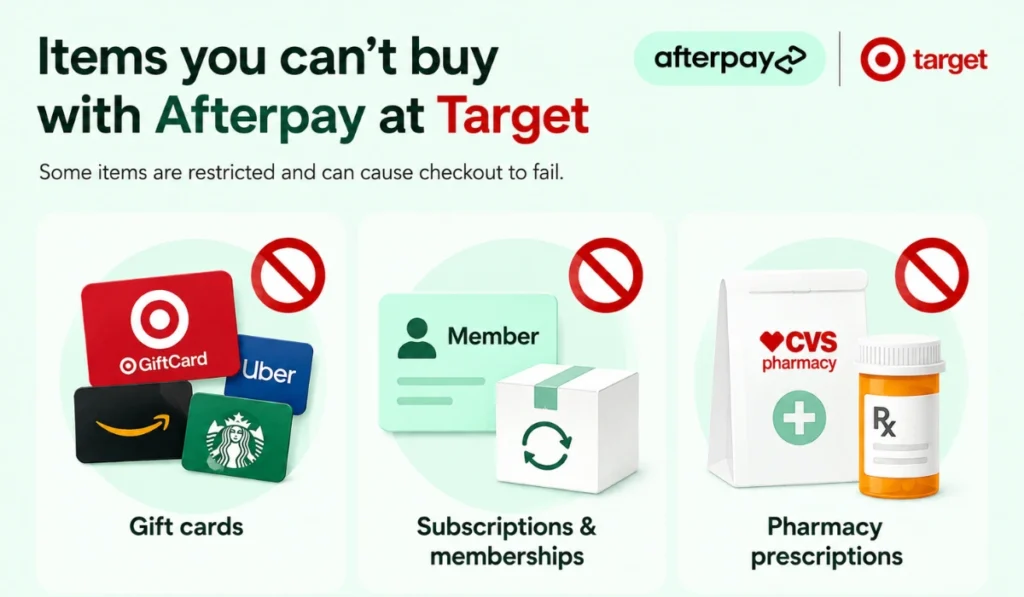
Target has some strict “No-Go” rules. Even if you have a high spending limit, their system will auto-reject your Afterpay card if you try to buy certain restricted items.
The Gift Card Rule: You cannot buy Target gift cards or any third-party cards (like Apple or Xbox). Retailers block this to prevent people from turning BNPL credit into quick cash.
No Subscriptions: You can’t use Afterpay for Target Circle 360 or any “auto-ship” grocery orders. Since the virtual card is for one-time use, it can’t handle recurring monthly payments.
CVS Pharmacy Issues: Prescriptions are a bit tricky. Since CVS inside Target uses its own payment system, it often doesn’t recognize Afterpay. Always keep a backup card if you’re hitting the pharmacy.
How do Target returns work with Afterpay?
Returning an Afterpay-funded item to Target is where things get a bit slow. Target’s standard 90-day return policy applies, but the money trail is complex.
When you return the item, Target sends the refund back to the Virtual Visa Card you used. Afterpay then receives that money and applies it to your remaining balance.
- The Wait Time: It usually takes 5 to 10 business days for the refund to reflect on your Afterpay account.
- Pro-Tip: If you have an installment due while you’re waiting for a refund, pay it. If you miss a payment, Afterpay will charge a late fee, regardless of whether a return is “in progress.”
If you want to know more about how long it takes for the money to hit your bank, check out our guide on the Afterpay Refund Process for a full breakdown.
Troubleshooting: Why was my Afterpay card declined at Target?
If your transaction fails at Target, it’s usually for one of these three reasons:
1. The 25% Rule
Afterpay isn’t a credit card with a $0 balance requirement. To start the plan, you must have the first 25% of the total order available in your bank account right now. If your cart is $200, and you only have $40 in your bank, the card will be declined.
2. Order Splitting (The Online Glitch)
This is a big one. Target often ships items from different warehouses. If you buy a lamp and a pack of diapers, Target might try to charge $150 for the lamp today and $50 for the diapers tomorrow. Because the Afterpay virtual card is usually for a one-time total amount, the second charge might get blocked.
- Solution: Try to choose “Ship my items together” if the option is available.
3. Spending Power vs. Cart Total
Always check your “Estimated Spending Power” in the app before you shop. If you try to checkout for $501 but your limit is $500, it’s an instant decline.
If your card is still being rejected after trying these steps, you might need to contact support through our Afterpay Customer Service Guide to fix any account blocks.
Final Thoughts: Is it Worth the Extra Steps?
Using Afterpay at Target is a great way to manage a large household haul without the 25% APR of a traditional credit card. While it’s slightly annoying that Target doesn’t have a direct “Afterpay” button, the virtual card workaround only takes about 60 seconds to set up.
As long as you remember to tap out of the store or use the in-app browser, you can shop at Target with the same flexibility you get at other major retailers.
Have you tried using the Afterpay Plus card at your local Target? Or did you run into an error with a split shipment? Drop a comment below—I’ve seen almost every error code and can help you figure it out!