

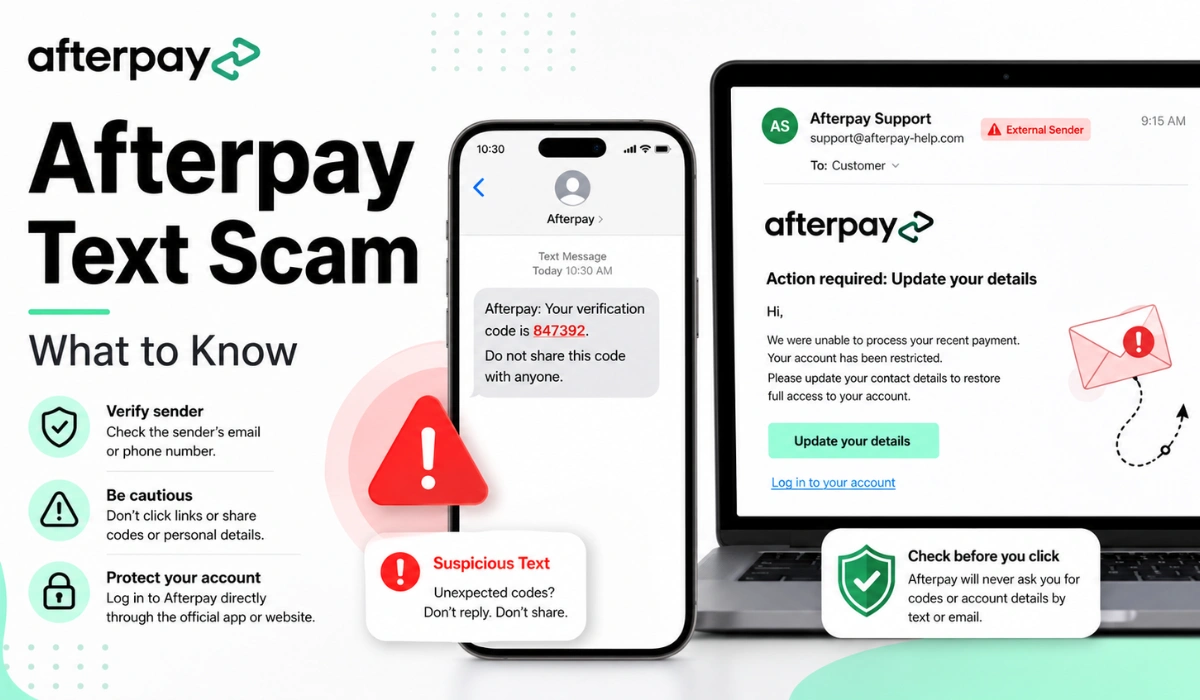
Quick Answer: An Afterpay text or email may be a scam if it asks you to click a login link, update payment details, or fix an account problem through a strange sender. Don’t click the link. Open the official Afterpay app or website yourself and check your account there.
Getting a message about a failed Afterpay payment can make you nervous. That is exactly why scammers use this kind of wording. They know people may click fast if the message says their payment failed, their account is restricted, or they need to update details right away.
Some fake Afterpay messages can look real at first. They may use the Afterpay logo, soft green colors, a “Log in” button, and wording that sounds serious. But a good-looking email does not always mean it is safe. Before you click anything, it helps to know what scam signs to look for.
This guide covers what an Afterpay text scam is, warning signs to check, what looks suspicious in messages like the screenshots you shared, and what to do if you already clicked a link.
What Is an Afterpay Text Scam?
An Afterpay text scam is a fake message that pretends to be from Afterpay. It may come as a text, email, or fake support notice. The goal is usually to get you to click a link and enter your login details, payment card information, phone number, or other personal details.
These scams often use payment-related fear. A message may say your payment was declined, your account is blocked, or your overdue orders need action. That can sound serious, especially if you already use Afterpay.
The trick is simple. The scammer creates a problem, then gives you a button or link to “fix” it. That link may take you to a fake page that looks like Afterpay. If you enter your details there, the scammer may get them.
Why Fake Afterpay Messages Can Look Real
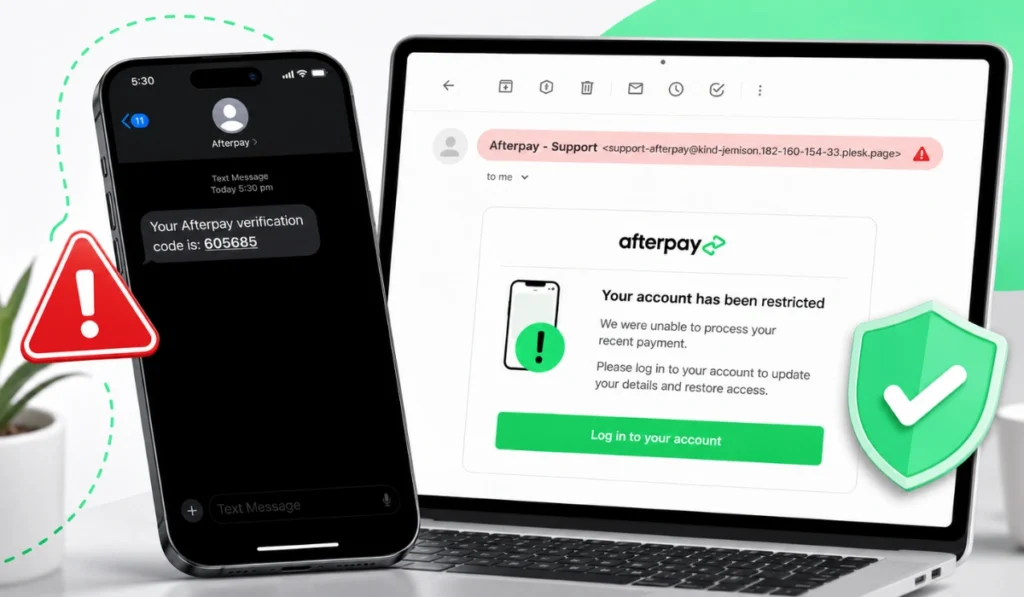
Fake Afterpay messages can look real because scammers copy brand style. They may use the Afterpay logo, similar colors, and words like “payment,” “account,” “orders,” or “support.” A busy person may only see the logo and click without checking the sender.
The screenshots I shared above show the kind of things users should be careful with. One message uses Afterpay branding and says the payment was unsuccessful. It also includes a login button and discusses overdue orders. Another message says the account is restricted from spending.
That kind of wording can create pressure. And pressure is a common scam tool. The message aims to make you feel you need to act now.
A real message and a fake message can both mention payments. So don’t judge by the topic alone. Check how the message asks you to act.
Common Signs of an Afterpay Scam Message
You do not need advanced tech knowledge to spot many scams. Most fake messages leave clues. Sometimes the sender looks wrong. Sometimes the wording feels strange. Sometimes the link is the main problem.
Watch for these warning signs:
- The sender address looks strange or unrelated to Afterpay
- The message comes from a random domain
- It asks you to click a login button
- It says your payment failed and pushes urgent action
- It asks you to update contact or payment details
- The greeting is very generic, like “Dear” or “Hi”
- The wording has grammar mistakes or feels awkward
- It says your account is blocked or restricted
- It pushes you to fix the problem through the message link
The sender is a big one. If the email address looks long, random, or not connected to a clear Afterpay domain, treat it as a warning sign. Don’t ignore that.
Also be careful with buttons that say “Log in to your account.” A scammer wants you to click that button because it can lead to a fake login page.
Real Afterpay Alert vs Fake Afterpay Scam
Some real account alerts may mention payment problems. That is why users get confused. The safer habit is not to decide from the email alone. Check inside your account directly.
| Feature | Safer Sign | Scam Warning Sign |
|---|---|---|
| Sender | Looks like an official Afterpay channel | Strange or unrelated sender address |
| Link | You can verify by opening the app yourself | Pushes you to click a login button |
| Tone | Clear account notice | Fear, pressure, or urgent action |
| Account check | Matches what you see in the app | Cannot be confirmed in your account |
| Wording | Clear and specific | Generic greeting or odd grammar |
The main thing to remember: you do not need to click a message link to check your Afterpay account. Open the app yourself. That one small habit can save you a lot of trouble.
What Looks Suspicious in Messages Like These?
The screenshots above show several strong warning signs worth noting.
The first sign is the sender. If the sender address does not look like a normal Afterpay email and includes a strange domain, that should make you pause. Scammers often use random domains while making the display name look official.
The second sign is the urgent subject. A line like “Update your payment was unsuccessful” or “Your last payment was declined” is meant to get attention fast. It may be real in some cases, but it should still be checked safely.
The third sign is the login button. Any message that tells you to log in from inside the email deserves extra care. If you need to check your account, open the official app or type the official website address yourself.
The fourth sign is wording that feels off. Some message says “your account having an overdue amount,” which does not sound natural. Small grammar problems do not always prove a scam, but they are warning signs.
What to Do If You Get a Suspicious Afterpay Text or Email
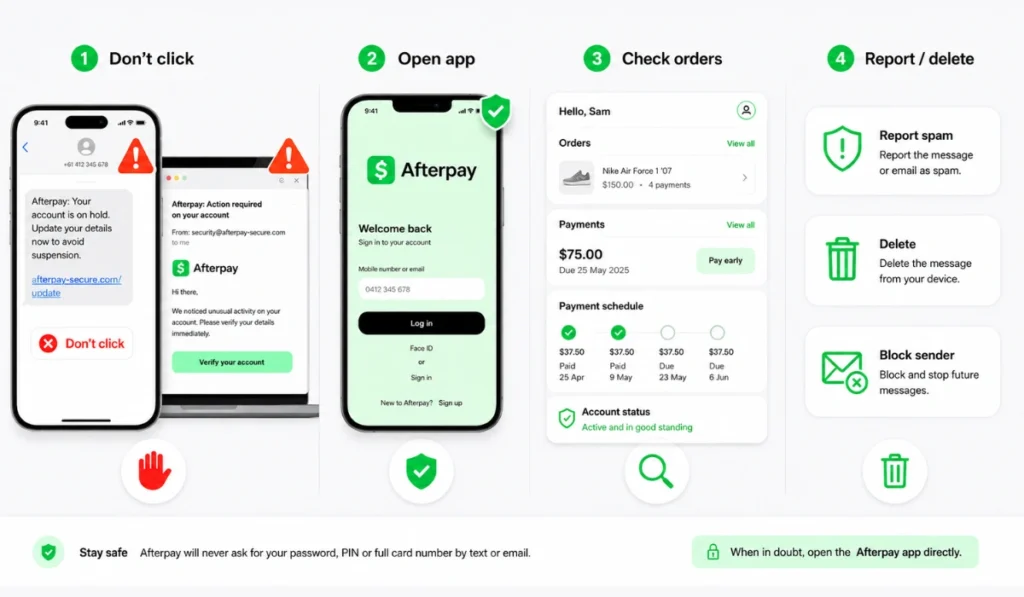
If you get a suspicious Afterpay message, slow down. Don’t click first and think later. The safest steps are simple.
Step 1: Do Not Click the Link
Do not click buttons or links in the message. This includes buttons that say “Log in,” “Update details,” “Manage account,” or “Fix payment.” A fake link can take you to a page that looks like Afterpay but is made to steal your information.
Even if the message looks clean, leave the link alone. You can check the issue another way.
Step 2: Open the Official Afterpay App Yourself
Open the Afterpay app from your phone. Do not open it through the message link. Once you are in the app, check your orders, payment schedule, account alerts, and payment methods.
If the message says a payment failed, see if your account shows the same thing. If your app does not show a problem, the message may be fake.
Step 3: Check Your Payments and Orders
Look at your active orders and upcoming payments. Check if any payment is overdue or marked as failed. Also review the payment method connected to your account.
If there is a real payment issue, handle it inside the official app or official website. Don’t go back to the text or email link.
Step 4: Report or Delete the Message
If the message looks fake, mark it as spam or phishing in your email app if that option is available. You can also delete it so you do not click it later by mistake.
Don’t reply to the message. Replying can sometimes confirm that your number or email is active.
What If You Already Clicked the Link?
If you clicked a suspicious link, don’t panic. It happens. These messages are designed to trick people.
If you only clicked the link but did not type anything, close the page. Then open the official Afterpay app and check your account. Keep an eye on your account activity for anything unusual.
If you entered your login details, change your Afterpay password through the official app or website. If you used that same password on other accounts, change it there too. Reused passwords can cause bigger problems.
If you entered card or bank details, contact your bank or card provider. Tell them what happened and ask what steps they recommend. Also review recent transactions and keep checking for anything you do not recognize.
Here is a quick checklist:
- Close the suspicious page
- Do not enter more details
- Change your password through the official app or website
- Review your Afterpay account activity
- Check your payment methods
- Contact your bank if card details were entered
- Watch for more suspicious messages
How to Protect Your Afterpay Account From Scams
A few simple habits can help protect your account. You don’t need to make it complicated.
Use the official app when checking orders or payments. Avoid login links from texts or emails, especially if the message feels urgent. Check the sender before trusting any payment warning.
Keep your password private. Do not share verification codes. Also try not to reuse the same password on many accounts. If one account is exposed, that can put other accounts at risk too.
It also helps to keep your phone, email, and apps updated. Updates may fix security issues and bugs. Not exciting, I know, but it helps.
Common Afterpay Scam Message Examples
Afterpay scams often use the same type of wording. The exact words may change, but the idea is usually similar.
Common scam message themes include:
- “Your payment was unsuccessful”
- “Your account is restricted”
- “Update your contact details”
- “Your payment method was declined”
- “Log in to avoid account limits”
- “Overdue payment action required”
- “Verify your account now”
Some of these topics can also appear in real account alerts. That is why you should not only judge by the subject line. The safer question is: does this message push me to click a link and log in?
If yes, stop and check through the app instead.
FAQs About Afterpay Text Scams
How do I know if an Afterpay text is a scam?
It may be a scam if the sender looks strange, the message pressures you to act fast, or it asks you to click a login link. Open the official app yourself and check your account there.
Does Afterpay send payment failed messages?
Afterpay may send account or payment alerts. Still, you should be careful with links. If you get a failed payment message, check your account through the official app or website.
Can fake Afterpay emails use the Afterpay logo?
Yes. Scammers can copy logos, colors, and email layouts. A logo alone does not prove the message is real.
Should I click a link in an Afterpay message?
It is safer not to click unexpected message links. Open the official Afterpay app or website yourself and check your account directly.
What should I do if I entered my login details?
Change your password through the official app or website. Review your account activity and update the same password anywhere else you used it.
How can I check my Afterpay account safely?
Open the official Afterpay app directly from your phone. Check your orders, payment dates, account notices, and payment methods from inside your account.
Final Thoughts
An Afterpay text scam can look real, especially when it uses the logo and talks about failed payments. But strange sender details, urgent wording, odd grammar, and login buttons are all warning signs.
The safest move is simple. Do not click suspicious links. Open the official Afterpay app or website yourself and check your account from there. If you already clicked, act quickly but stay calm. Change your password, review your account, and contact your bank if you shared payment details.
Have you received a suspicious Afterpay text or email recently? Drop a comment and share whether it came by text, email, or a fake login page.